Step 4A: ROI and Bay Proportion
Purpose
Define the Region of Interest (ROI), a rotatable rectangle that isolates one vault bay on the projection image, and estimate the bay proportion used by later sub-stages.
Workflow
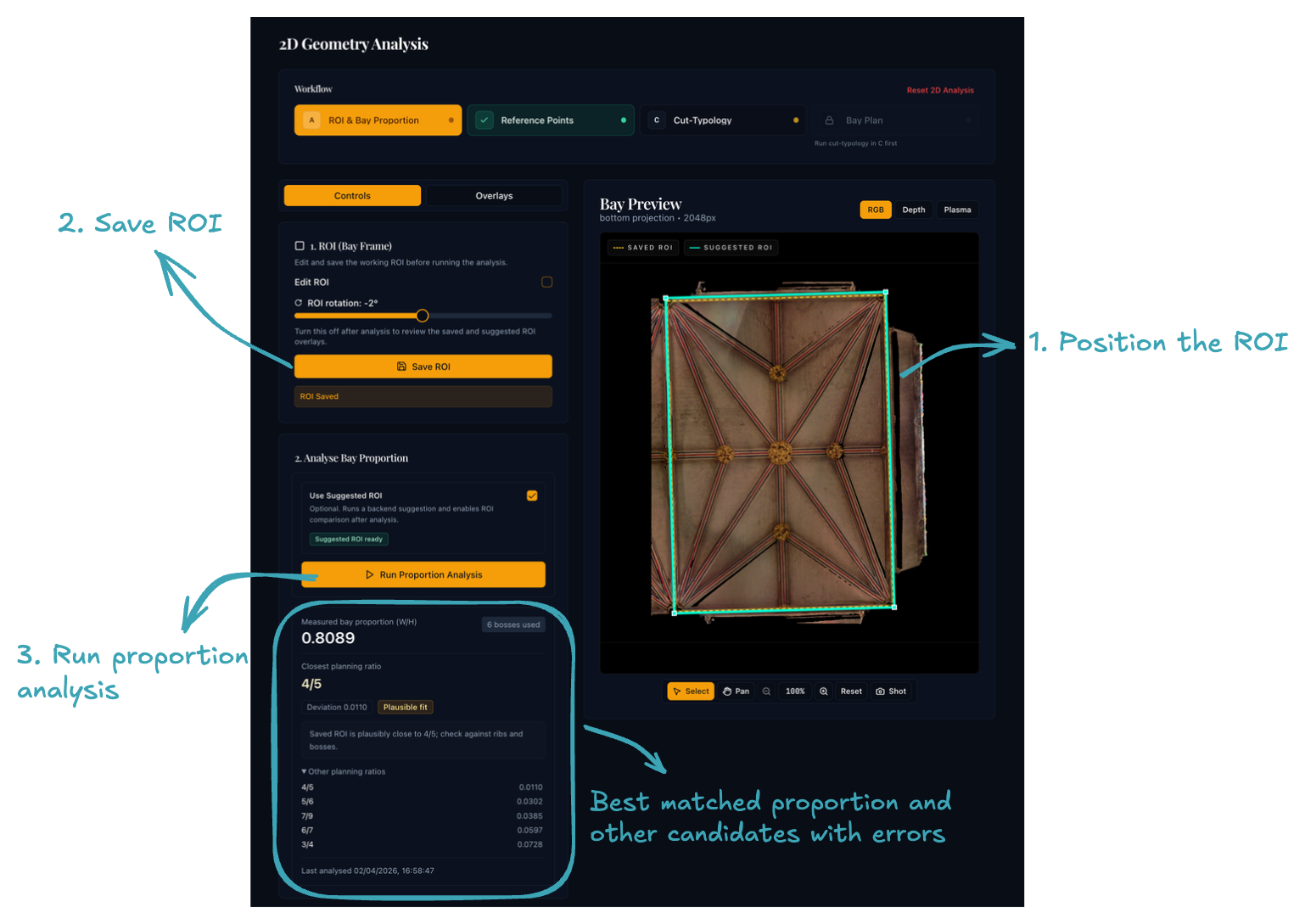
1. Position the ROI
Use the interactive canvas to place the ROI over the vault bay:
- Drag to move the rectangle.
- Corner handles to resize.
- Rotation handle to align with the bay boundaries.
Use the overlay controls to check that the ROI encloses the bay you actually want to analyse.
2. Save the ROI
Click Save ROI. Later sub-stages use the saved ROI, not the unsaved on-screen draft.
3. Run proportion analysis
Click Run Proportion Analysis. The application will:
- compute the bay's measured proportion
- show ratio suggestions that are close to that measured value
4. Optionally auto-correct the ROI
Beta feature
Auto-correction is still under testing. Results should be reviewed carefully.
If you are unsure about the ROI placement, tick Use Suggested ROI and run the analysis again. The app then searches nearby placements and rotations to look for a better fit against the detected geometry.
Use the Overlays tab to compare the saved and suggested ROI outlines. If the suggestion is not an improvement, untick Use Suggested ROI and re-run the analysis to revert to your manually placed ROI.
Understanding the ratio suggestions
Medieval vault bays were set out using proportional systems to define the relationship between length and width.1 The ratio suggestions shown after analysis tell you which of these systems best matches the bay you are analysing:
Modular ratios — simple whole-number proportions such as 2:1, 3:2, 4:3, or 5:4. These are the most common; for example, the retrochoir aisles at Wells use 3:2 and the Lady Chapel at Chester uses 4:3.
Quadrature proportions — ratios derived from rotating a square (1:√2, 1:√3, 1:√5, etc.). The chancel at Nantwich may use 1:√2; 1:√5 proportions have been identified in the Wells transept.
Golden rectangle — the proportion 1:φ (1:1.618…). Widely discussed in studies of medieval architecture but not yet confirmed in any of the Tracing the Past case-study vaults.
You do not need to choose one of the suggested ratios manually. They are there to support interpretation, while the measured proportion is carried forward automatically.
Before moving on
You should have:
- a saved ROI that cleanly encloses one bay
- a measured proportion that looks consistent with the visible geometry
Click Reference Points on the workflow stepper bar at the top to continue to sub-stage 4B.
-
For a detailed account of medieval proportional systems see Measurements and Proportions — Tracing the Past. ↩