Step 4C: Cut-Typology Matching
Purpose
This sub-stage identifies which geometric template best explains the boss positions inside the bay. The result helps the app regularise the plan before reconstruction.
Background: starcuts and circlecuts
Medieval vault designers set out rib plans by drawing construction lines through a starting figure inscribed within the rectangular bay. The intersections of these lines defined the positions of bosses and the start/end points of ribs.1
Vault Analyser tests several template families derived from this tradition:
Starcut (standard grid) : An n-by-n regular grid dividing the bay into equal fractions along both axes. Grid intersections correspond to the fractional positions at which medieval designers placed tiercerons and lierne junctions. The app tests divisors from n = 2 to n = 6 by default.
Inner circlecut : A circle with radius equal to the bay's longest side, drawn centred on the bay. Intersections between this circle, the bay's bisectors, and lines to the corners produce keypoints that do not correspond to simple fractions.
Outer circlecut : Similar, but the circle passes through all four bay corners (radius = half diagonal), producing a different set of construction-line intersections.
Cross templates : Hybrid variants combining x-axis ratios from one family with y-axis ratios from another (e.g. starcut x + circlecut inner y), capturing asymmetric designs.
Workflow
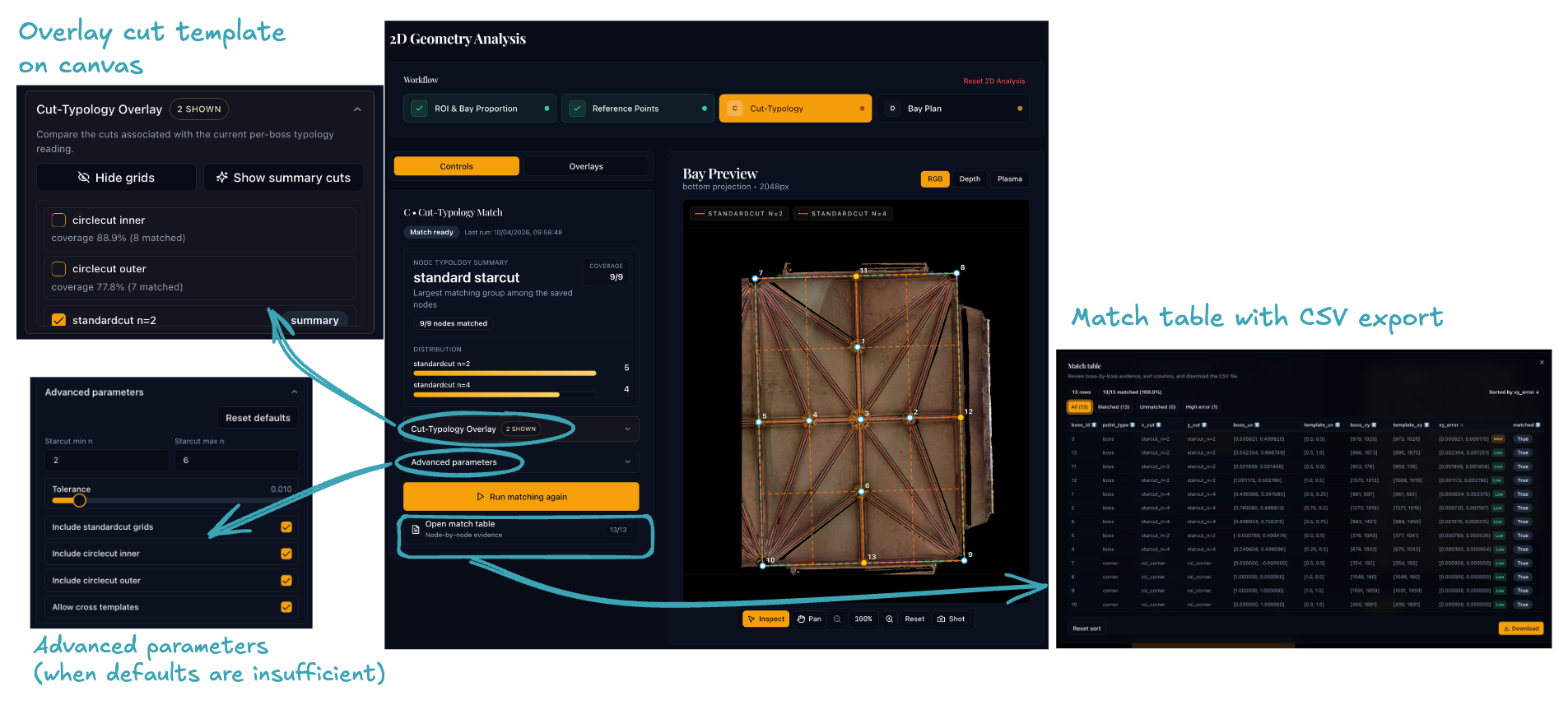
1. Review the matching settings
Start with the default settings. Tune the advanced parameters below only if the defaults do not produce satisfactory results.
| Parameter | Default | Description |
|---|---|---|
| Starcut Min n | 2 | Lower bound for standard-grid divisors |
| Starcut Max n | 6 | Upper bound for standard-grid divisors |
| Include starcut | On | Enable standard n-by-n grid variants |
| Include circlecut inner | On | Enable the inner circle variant |
| Include circlecut outer | On | Enable the outer circle variant |
| Include cross templates | On | Allow x/y ratios from different families |
| Ratio tolerance | 0.01 | Maximum absolute ratio distance for a coordinate to count as matched |
2. Run matching
When you run matching, the backend:
- Builds template variants — generates keypoints in (u, v) unit space for each enabled family.
- Extracts ratio sets — collects the unique x-ratios and y-ratios from each variant's keypoints.
- Matches bosses to ratios — for every boss, finds the nearest x- and y-ratio. If both distances fall within the configured tolerance, the boss counts as matched.
- Ranks variants — sorts by the number of matched bosses; ties are broken in favour of the lowest divisor n.
- Persists results — saves the matching payload to
cut_typology_result.jsonand a per-boss CSV toboss_cut_typology_match.csv.
Each matched boss receives an idealised template position that can be preferred over the raw centroid during reconstruction.
3. Inspect the result
- Compare the template overlays against the boss positions on the canvas.
- Continue only when the leading result looks plausible against the visible geometry.
If no template produces a believable match, try the following before moving on:
- Widen the ratio tolerance slightly (e.g. from 0.01 to 0.02).
- Enable Include cross templates if it is off.
- Return to sub-stage 4B to remove any spurious reference points that may be pulling the match off.
- Return to sub-stage 4A to check the bay proportion — a significantly wrong proportion will misplace all template ratios.
Why it matters
The matching result directly informs reconstruction. A good match can stabilise the bay plan; a bad match can push the reconstruction toward the wrong geometry.
Before moving on
You should have:
- a completed matching result with a believable leading template
- the majority of bosses matched to that template (as a rough guide, aim for ≥ 80 % of bosses matched)
- boss placements that broadly agree with the template overlay on the canvas
Click Bay-Plan Reconstruction on the workflow stepper bar at the top to continue to sub-stage 4D.
-
For a detailed account of starcut geometry and its application in medieval vaulting see Plans — Tracing the Past. ↩